Getting Started with Draw Your Cart!
Lobby to first boss — a clear path for new riders on desktop, mobile, console, and tablet.
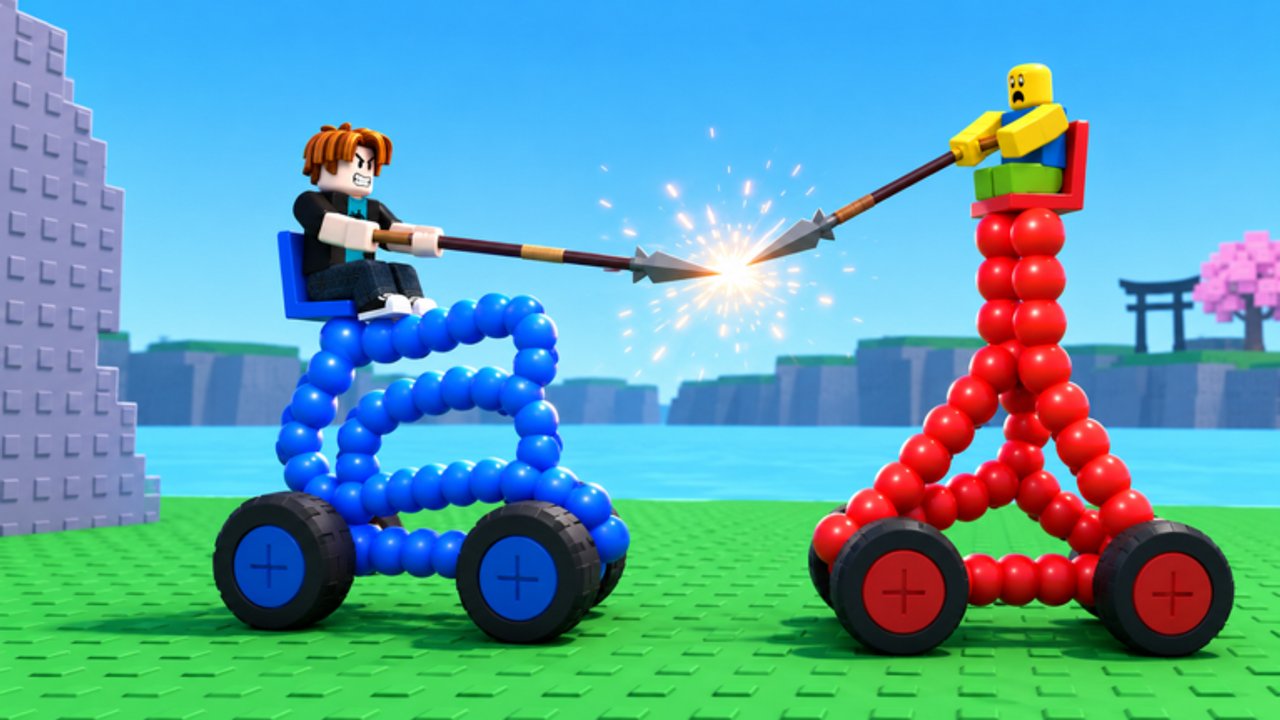
Welcome to Draw Your Cart!, the Roblox drawing combat game from SendyStudios (Adam / adamdoesroblx). You sketch a cart with limited ink, join a rider, wheels, and a weapon into one machine, then swipe into battle. Wins pay coins for ink upgrades; every tenth win is a giant boss; DUEL lets you 1v1 another player in the server. This guide covers your first hour: lobby flow, drawing rules, fight controls, early upgrades, and when quests unlock. Cross-check deeper pages as you go — especially How to Draw Carts, Upgrades and Ink, and the Guides Hub.
What the game is asking you to do
Official play loop in plain terms:
- Draw a cart with limited ink so the rider, wheels, and weapon stay connected.
- Press FIGHT! and swipe to drive into the enemy cart.
- Win by knocking the rider off, pushing them into water, slamming them into the ground, breaking pieces off their cart, or smashing through walls when the arena allows it.
- Spend coins in UPGRADES — prioritize more INK so later drawings have room to breathe.
- After 10 wins, unlock QUESTS, check CAREER stats, and prepare for the recurring boss every tenth win.
- Optional: press DUEL for a live 1v1, or browse SKINS for hats, balls, wheels, and flags.
Platforms: Desktop, Console, Mobile, and Tablet. The same ink budget and fight rules apply; only the drawing input feel changes.
Lobby and first session checklist
When you join, orient yourself before freestyling a masterpiece.
- Find FIGHT, DUEL, UPGRADES, SKINS, and any quest or career panel once they appear.
- Confirm you understand that ink is a hard cap — doodling decorative loops early wastes ink you need for structure.
- Plan a simple triangle or wedge frame for round one. Fancy art can wait until you have upgrade levels.
- After each win, bank coins toward ink before cosmetics. Power compounds; hats do not knock riders off.
If you came from mobile physics games like Draw Joust-style experiences, the muscle memory helps, but Draw Your Cart! still rewards clean joints and intentional weapon reach. Read How to Draw Carts before your second redesign session.
Drawing phase — keep the three parts joined
Ink is the resource that defines every build. Your drawing must join the rider, wheels, and weapon. Gaps or floating pieces fail the connection test or collapse under the first hit.
Practical beginner rules:
- Start at the rider seat or chassis center, then pull lines to wheel hubs so the vehicle can roll without shearing.
- Place the weapon where it will meet the enemy first — usually forward and slightly elevated for spears and lances, lower for rams.
- Prefer short, confident strokes over dozens of tiny scribbles. Every millimetre of ink spent on fluff is ink not spent on structure.
- Leave a small reserve so you can reinforce a weak joint if the preview looks fragile.
Common first-day mistakes: drawing a huge outline with no internal bracing; putting the weapon on a hair-thin stalk; forgetting a second wheel so the cart tips instantly; spending the whole budget on spikes that never touch the opponent. For ranked archetypes later, see Cart Builds Tier List and Weapons Tier List.
Fight controls — swipe with intent
After you lock the drawing, press FIGHT! Combat is swipe-driven: you steer momentum into the enemy rather than tapping a complex combo list.
Focus on outcomes the game already lists:
- Hit the enemy rider with your weapon to knock them off.
- Push them toward water or off stable ground.
- Break pieces so their structure loses strength mid-clash.
- Use walls and terrain when available to finish a damaged cart.
Timing tips for new players:
- Do not spam full-speed charges if your weapon sits behind a blunt nose — angle so the blade or tip leads.
- After a glancing blow, reset distance with a short swipe reverse or curve if the controls allow, then re-commit.
- Watch whether the opponent is top-heavy; a low hit can flip them faster than a high poke.
- If your cart sheds a wheel, play safer and aim for rider contact rather than trading chassis damage.
Practice these habits in normal fights before you queue a Duel. Duels punish sloppy ink waste because you cannot casually farm another AI wave between redesigns.
First upgrades — ink before vanity
Coins from wins feed the UPGRADES shop. Early priority is almost always more ink. Extra ink lets you thicken frames, add bracing, and mount longer weapons without orphaning the rider. Attack or health-style upgrades matter, but they amplify a cart that already holds together; they cannot fix a disconnected doodle.
Suggested first-hour spend order:
- Ink capacity (multiple ranks if cheap).
- Whatever directly improves survivability or hit impact once ink feels usable.
- Cosmetics only after you stop failing connection or tipping every other fight.
Deep dive: Upgrades and Ink. Resist the urge to empty your wallet on skins during the tutorial streak — Skins and Cosmetics explains what is pure flair versus wheels or balls that change silhouette.
Boss every 10 wins — prepare, do not panic
The official description is clear: every 10th win is a giant boss fight. Treat win nine as a prep checkpoint.
Before the boss:
- Redesign with maximum ink focused on reach and structural integrity.
- Prefer weapons that can touch a large target without requiring a perfect center hit.
- Spend spare coins on ink if you are still under-upgraded.
- Mentally rehearse knock-off and water-push win conditions; bosses may shrug off chip damage that works on normal carts.
After a loss, do not rage-redraw a heavier mess. Diagnose: Did you miss the rider? Did your frame snap? Did you tip? Then fix one failure mode. Full boss strategy lives in Boss Fights.
Quests at 10 wins and career stats
At 10 wins you unlock QUESTS and can review CAREER stats. Quests give direction when free play starts to feel aimless — complete them while you still experiment with shapes. Career stats help you notice patterns (win streaks, duel results) so you know whether to invest in drawing practice or fight timing.
Use the milestone as a wiki tour stop:
- Refresh How to Draw Carts with your new ink budget.
- Skim Weapons and Cart Builds for archetypes that match your swipe style.
- Read Boss Fights before the next multiple of ten.
- Try one Duel once you can consistently beat standard opponents.
Mobile, tablet, desktop, and console notes
- Touch: Draw slower; zoom if the UI allows; avoid palm rejection issues by keeping strokes deliberate.
- Mouse: Easier precision for thin spears — still respect ink; precision is not free length.
- Controller: Learn the draw mapping early so you do not burn ink on accidental loops.
- All platforms share the same economy and boss cadence, so advice on this page transfers.
First-hour goals (printable mental list)
- Produce one cart that stays connected under a real hit.
- Win several fights using rider knock-off or water push on purpose, not by accident.
- Buy at least one meaningful ink upgrade.
- Survive or learn from the first boss checkpoint.
- Unlock quests at 10 wins and pick a build archetype to practice.
- Bookmark Guides, Tier List, and Updates for patch changes after the November 2026 launch window.
Where to go next
- Controls: Controls
- Drawing craft: How to Draw Carts
- Economy: Upgrades and Ink
- PvP: Duels
- Milestones: Boss Fights
- Quests: Quests and Career
- Fashion: Skins and Cosmetics
- Meta: Cart Builds, Weapons
- Patch context: Launch Notes
Draw Your Cart! rewards clarity under pressure. Keep rider, wheels, and weapon joined, swipe so the weapon leads, spend coins on ink first, and treat every tenth win as a scheduled exam. Master that loop and the rest of the wiki becomes optimization instead of survival.
Frequently Asked Questions
Quick answers for Draw Your Cart players.
What do I need to connect when drawing a cart?
Your ink drawing must join the rider, wheels, and weapon into one connected cart. Gaps or floating pieces will fail or fall apart in FIGHT.
How do I control the cart in battle?
Press FIGHT! then swipe to drive. Aim to hit the enemy rider, push them into water or the ground, break pieces off their cart, or use walls when the arena allows.
When do bosses and quests appear?
Every 10th win is a giant boss fight. Quests unlock at 10 wins, and you can track CAREER stats from that milestone onward.
What should I buy first with coins?
Prioritize UPGRADES that increase INK. More ink improves every future drawing. Save most cosmetics in SKINS until your carts stop collapsing.
Does Draw Your Cart! support mobile and console?
Yes. The experience supports Desktop, Console, Mobile, and Tablet with the same core loop of draw, fight, upgrade, duel, and skins.